

Structure Inventory and Associated Properties
Chapter Overview
A structure inventory represents geospatial locations that contain damageable elements, typically a structure such as a home. Structure inventories are required by LifeSim to estimate direct economic damage for a flood event and initial population distribution. LifeSim can accept structure inventories in the form of point shapefiles generated outside LifeSim or downloaded from a National Structure Inventory (NSI) database [?]. See Appendix E for a discussion of NSI 2026. This chapter describes how structure inventories and their attributes are used in LifeSim.
The structure inventory must have the attributes defined in Table regardless of source. When importing from a shapefile, the user can specify required attributes (Table) by associating them with the shapefile attributes. If a required attribute is missing from the source shapefile, a user-defined default value can be globally assigned to all structures. The NSI has all of the required attributes which are included during import.
| Required Attribute | Definition |
|---|---|
| Occupancy type | Describes a class of structures (e.g., single family, no basement, raised foundation, one story). |
| Number of stories | Number of stories of a structure. |
| Construction type | Describes what the structure is made of; predominant building material. |
| Foundation height | The difference between the ground elevation and the ground floor elevation. |
| Ground floor height | Difference between the floor elevation and ceiling elevation of the ground floor. |
| Above ground floor height | Difference between the floor elevation and ceiling elevation for each story above the ground floor. |
| Attic height | Difference between the ceiling elevation of the highest story and the roof elevation; may be zero in some structures. |
| Population under 65 (night) | Estimate of people within a structure under the age of 65 during the night (assumed to be 2 AM). |
| Population over 65 (night) | Estimate of people within a structure over the age of 65 during the night (assumed to be 2 AM). |
| Population under 65 (day) | Estimate of people within a structure under the age of 65 during the day (assumed to be 2 PM). |
| Population over 65 (day) | Estimate of people within a structure over the age of 65 during the day (assumed to be 2 PM). |
| Structure value | Value of a structure, typically in thousands of dollars. |
| Content value | Value of what is inside the structure. |
| Other value | User-defined category. |
| Vehicle value | Value of vehicle(s) associated with structure. |
Occupancy Type
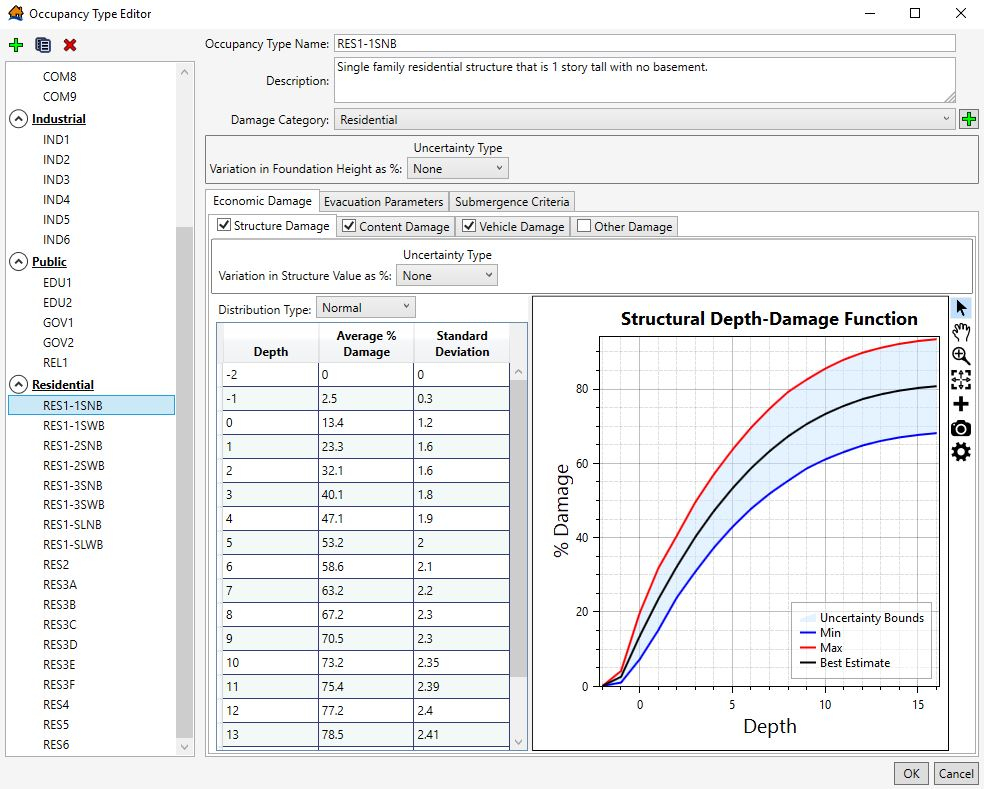
Structure occupancy types define common information for similar structures. Data used by the occupancy type include:
- Depth-percent damage functions (structure, content, and other)
- Structure value uncertainties
- Foundation height uncertainties
- Evacuation parameters
- Structural submergence criteria
The location of these parameters is in the LifeSim Occupancy Type window, shown in Figure.
Each structure is required to have an occupancy type. Default occupancy types used in LifeSim follow the naming convention developed for Hazus (FEMA, 2019) [?] and are listed in Appendix E.
Damage categories represent a grouping of occupancy types. LifeSim default damage categories are residential, commercial, industrial, and public. The user may specify their own occupancy types with unique depth-damage functions and uncertainty parameters. Structure inventories imported from the NSI will automatically have the LifeSim default occupancy types defined as attributes.
Depth-Damage Functions
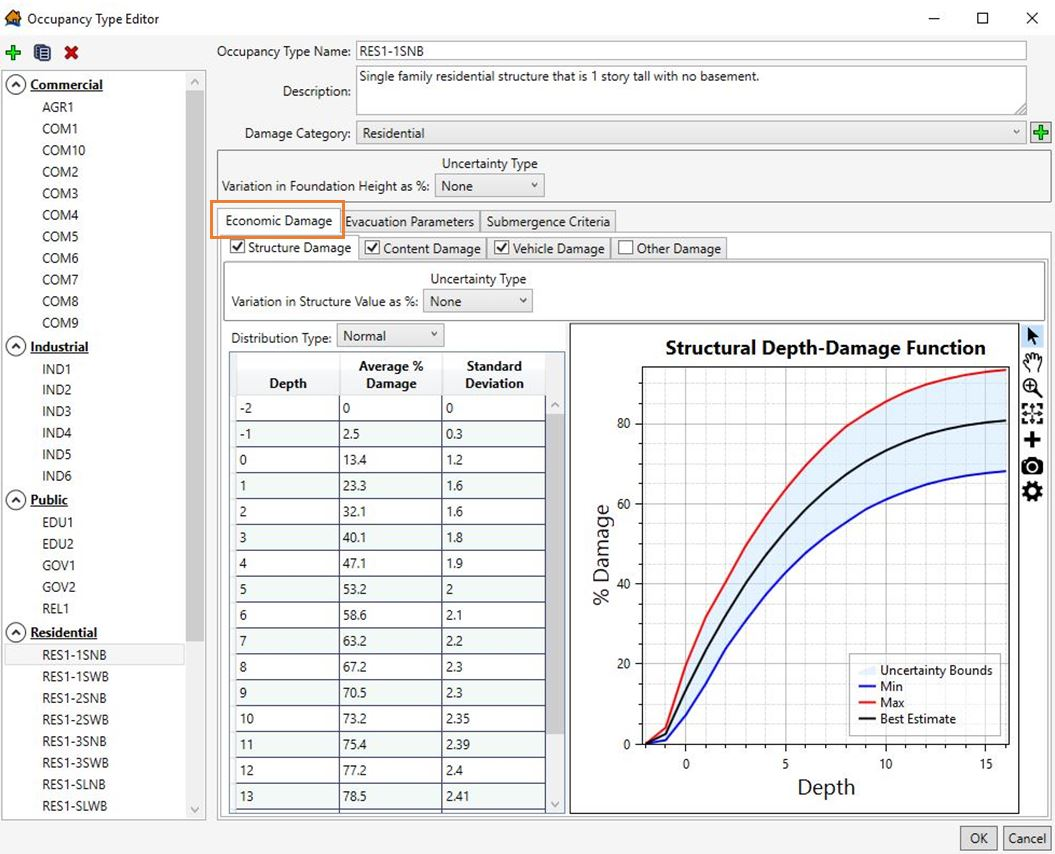
For each occupancy type in the structure inventory, depth-damage functions are specified as shown in Figure. A depth-damage function is included for each default occupancy type for structure, content, and vehicle damage (USACE, 2003; FEMA, 2019) [?] [?]. All curves can be edited by the user, and user-defined curves can be added. Structure damage is also computed using structure stability criteria. Refer to Structure, Content, Vehicle, and Other Damage for additional information on structure damage computations.
Evacuation Parameters Defined by Structure Occupancy Type
In LifeSim, some evacuation parameters are specified by occupancy type. Table summarizes the various evacuation parameters, potential ranges for each, and the impact they have on the model outcome.
| Parameter | Default | Range (Best Practice) | Source Data / Considerations | Sensitivity to Results |
|---|---|---|---|---|
| Population in structure warned at the same time | All occupancy types except multi-family residential (RES3) | On or off | Determines if population within a structure is warned independently or together. | Low-High |
| Population in structure takes protective action at the same time | Only on for AGR1, RES1, RES5, and RES6 | On or off, only available to population warned at the same time. | Determine if population within a structure can mobilize independently. | Low-High |
| Probability of access to roof or attic | 0.95 | 0-1.0 | Parameter set based on structure access, not population mobility. | Sensitive to depth of flooding and arrival time. |
| Fraction to roof vs attic | 0.9 | 0-1.0 | Parameter set based on structure access, not population mobility. Variable with percentage of structures with attics. | Low |
| Fraction of population that evacuate in vehicles vs on foot | 100% | 0-100 | Use of road network for pedestrians. Location dependent. Availability of public transport. | High |
| Evacuating group size | 3 for all occupancy types except RES5. 48 for RES5 | 1-48 | Based on capacity of vehicle used for evacuation. | High if structures have high number of occupants and road network is congested. |
Population in Structure Warned at the Same Time
By default in LifeSim, all occupants within a single structure of any occupancy type (except multi-family residential [RES3]) receive a warning at the same time. This assumes that for all structures sharing the occupancy type, no matter how large or disconnected the structure, a system can warn the entire building at once. In a large department store or warehouse, this would take the form of an intercom as most large office buildings have emergency warning systems. Apartment buildings do not have such systems; therefore, the default assumes each apartment acts as an independent residence. This does not account for apartments having close proximity to each other where residents are more likely to receive a first alert from their neighbor either as a verbal tip or visual cue.
- Default
- Range (Best Practice)
- Source Data / Considerations
- Sensitivity to Results
Population in Structure Takes Protective Action at the Same Time
By default, only four occupancy types (agricultural, single-family residential, institutional dormitories, and nursing homes) take protective action at the same time. This parameter is only available when the occupants in the structure are warned at the same time; therefore, the first alert and protective action timeline should be the same for all evacuation groups within the structure. With the population in a structure taking protective action at the same time, all groups within a structure will evacuate nearly simultaneously. This assumes that single-family residences will choose to evacuate using a single or multiple vehicles at the same time. Institutional dormitories such as prisons and school housing, as well as nursing homes, contain residents that often lack the means to mobilize independently, and whose safety is a liability to the party operating the residence. The default for these occupancy types is set to evacuate at the same time using buses or a similar system of mass transit.
- Default
- Range (Best Practice)
- Source Data / Considerations
- Sensitivity to Results
Probability of Access to Roof or Attic
This parameter refers to an occupant's chances of reaching either the roof or attic when evacuating vertically, providing them with increased above-ground height that increases their chances of survival depending on the hydraulics present at their structure. The current default for all occupancy types for probability of access to the roof or attic is 0.95, meaning that 95% of occupants will reach the roof or attic when evacuating vertically. A minority of occupants (5%) with full mobility will either lack the knowledge to access the roof or attic, be in a building that does not have access, or choose not to try. Those occupants with limited mobility are excluded from accessing the roof or attic.
- Default
- Range (Best Practice)
- Source Data / Considerations
- Sensitivity to Results
Fraction to Roof vs Attic
This parameter defines subsets of those with access to the roof or attic, and refers to the highest level attained by an occupant who is able to access the roof or attic. A percentage will be able to access the roof while others will be stuck in the attic. Users should consider many structure types do not have an attic, so the fraction for that occupancy type should highly favor going to the roof. Also, LifeSim does not explicitly track people who go to the attic first and then end up on the roof. The default for all occupancy types for fraction to roof vs. attic is 0.9, meaning that 90% of occupants who are able and have access will go to the roof. The default assumes that most people would ultimately continue to the roof if confronted with water in the attic, although some may be trapped. The default fraction assumes that a minority of occupants (10%) who have evacuated to the attic will lack the knowledge, will, or ability to reach the roof, if needed.
- Default
- Range (Best Practice)
- Source Data / Considerations
- Sensitivity to Results
Fraction of Population that Evacuate in Vehicles vs on Foot
The default for the fraction of people evacuating on foot or by vehicle is set to begin the evacuation model using 100% vehicle evacuation. Roadway data are relatively readily available, but data on sidewalks, paths, and other infrastructure is minimal. Therefore, those evacuating on foot do so along the same roadway segments utilized by vehicular traffic. This may not accurately capture the population evacuating on foot as they are forced to use roadway networks and would otherwise likely cut through areas like parks and other surfaces not accessible to vehicles. Currently LifeSim does not have the capability to add a pedestrian network for people evacuating on foot.
- Default
- Range (Best Practice)
- Source Data / Considerations
- Sensitivity to Results
Evacuating Group Size
The evacuating group size, or number of people per evacuating vehicle, must be defined. This variable is defined by occupancy type with a default of three people per vehicle for all occupancy types except RES5 (institutional dormitories). The default is based on a family evacuating together in a standard automobile. If the warning is issued during daytime hours, most people would initially leave commercial and industrial structures (places of employment) alone in their vehicles resulting in a much smaller average group size. However, after leaving the workplace, people would likely convene with their family at home and evacuate as a group, resulting in an evacuation group size closer to three. These additional stops, known as "trip chaining," are not included in LifeSim simulations. In LifeSim, people travel directly from their structure of origin towards their chosen destination.
For RES5 structures, the evacuating group size default is 48 people per vehicle. This is based on historical evacuations of these types of structures, which typically use buses to move large numbers of people.
- Default
- Range (Best Practice)
- Source Data / Considerations
- Sensitivity to Results
Submergence Criteria
Submergence is defined as a water level at a structure that can affect probability of survival. Submergence criteria are used to define the threshold between high hazard and low hazard conditions when people are trapped in a flooded structure. They are defined by occupancy type and are used in coordination with the roof and attic accessibility described above. The threshold of submergence is an uncertain parameter sampled uniquely for each structure. A description of each submergence criterion, its application, and default values are shown in Table.
| Submergence Criteria | Description | Applied To… | Default Values |
|---|---|---|---|
| A. High hazard depth from floor | If depth from floor is above the threshold, then people will be placed in the high hazard zone. | Limited mobility occupants | 4–6 feet, triangular distribution with 5 feet best estimate. |
| B. High hazard depth from ceiling | If depth from top of ceiling is above the threshold, then people will be placed in the high hazard zone. | Able-bodied occupants | 0.5–1.5 feet, triangular distribution with 1 foot best estimate. |
| C. High hazard depth on roof | If depth over the roof is greater than the threshold, then people caught on roof will be placed in the high hazard zone. | Able-bodied occupants | 3–5 feet, triangular distribution with 4 feet best estimate. |
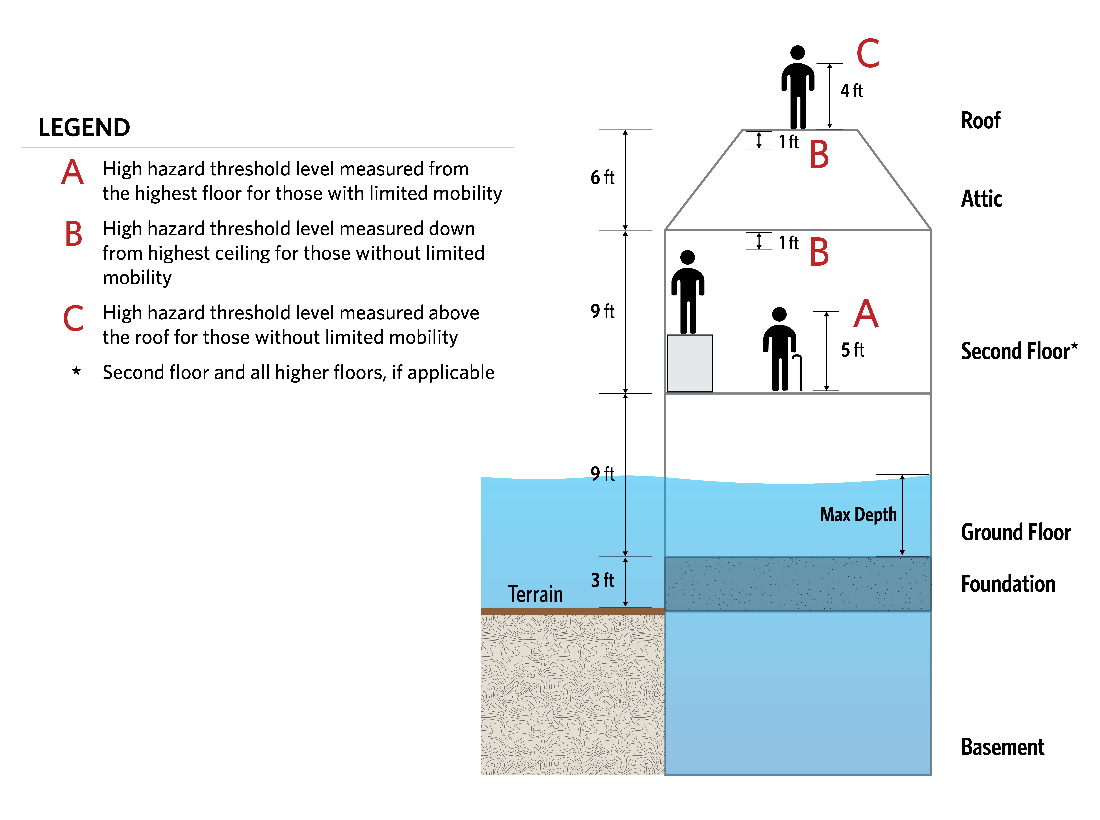
The structure submergence criteria come in three types, defined as A, B, and C in Figure. Submergence criterion A is measured from the floor of the highest story in a building and used by people with limited mobility. The assumption in the default values is that people with limited mobility can get to the highest floor in any building (possibly with assistance from others), but that they do not climb or swim. Submergence criterion B is measured down from the ceiling of the highest story, representing an air pocket in a deeply flooded structure. Criterion B is used for people without limited mobility who do not have access to the roof. This criterion is also used for people who go to the attic instead of the roof. The assumption in the default values is that people will climb on top of something to stay above the water.
Submergence criterion C is measured from the top of the roof. It is used by people without limited mobility who access the roof. The assumption in the default values is if the water is higher than the roof, it must be slow moving or the structure would have already collapsed (and no vertical evacuation calculated). However, there may be some velocity and exposure to external elements like debris/rain/wind, so the values are lower than criterion A.
The following is an example calculation using Figure for reference for water that is 18 feet deep at the structure. The in-structure depth is 15 feet (15 = 18 - 3). For a two-story building with no attic access and assuming the thresholds sampled the best estimate, Criteria A is 14 feet (14 = 9 + 5), Criteria B-top floor is 17 feet (17 = 9 + 9 - 1), Criteria B-attic is 23 feet (23 = 9 + 9 + 6 - 1), and Criteria C is 28 feet (28 = 9 + 9 + 6 + 4). A person with limited mobility would be in the high hazard zone, but those who are able bodied in the structure would be low hazard.
Building Stability Criteria
Building stability criteria refer to the hydraulic conditions used to determine whether or not a structure collapses when exposed to flooding. Generally, stability criteria thresholds are defined as a function of depth and velocity relative to the first floor of the structure. During a simulation, if both the depth and velocity reach a point above the functional threshold, then the structure is assumed to collapse.
Building collapse is considered a high hazard situation for human safety and can have a significant impact on estimated life loss. LifeSim 2.0 stability criteria must be assigned to each structure within the structure inventory prior to running a simulation. The building stability criteria used in LifeSim builds on what was initially developed as the Loss-of-Shelter function by Aboelata and Bowles (2005) [?]. Users can create their own stability criteria thresholds or select from a set of stability thresholds included in the software. The LifeSim default building stability criteria are based on five common construction types (Appendix F). The five construction types are as follows:
- Engineered: Steel and reinforced concrete construction where the walls are non-load bearing and instead the columns and beams carry the load. Walls may be masonry, wood, glass, etc. and are susceptible to collapse separate from the superstructure.
- Wood-Anchored: Typical wood frame structure with load bearing walls that is bolted or anchored to the foundation and therefore less susceptible to floating off the foundation. Heavy construction structures made of heavy materials such as large timbers, homes with a brick façade, and homes with 2 or more stories are also more likely to resist floating and therefore may also be considered "anchored."
- Manufactured: Prefabricated houses that are constructed off-site and then assembled at the building site in sections e.g., mobile homes.
- Masonry: Unreinforced stone or block structures.
- Wood-Buoyant: Typical wood frame structure with load bearing walls that is not anchored or bolted to the foundation and is therefore highly susceptible to floating off the foundation.
Most available research regarding structural flooding focuses on monetary damage models using depth-damage (in dollars) functions as opposed to stability. Appendix F summarizes a literature review of the best available information to date regarding stability and proposes recommended stability criteria for each construction type. Due to the variability in the functions presented, uncertainty is applied to the recommendations where applicable. Uncertainty is included to inform risk characterization by accounting for natural variability in hydraulic conditions and imperfect knowledge regarding construction types, quality of building components, weight, and other variables that can impact the overall stability of a given structure.
Assigning Structural Stability in LifeSim
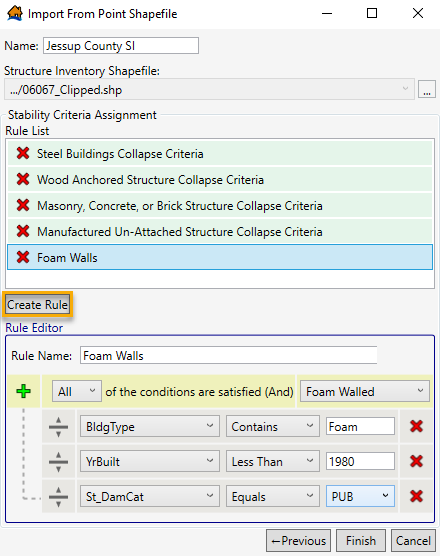
When importing structures from a shapefile, the user must assign structure stability functions. Stability criteria are assigned to structures using rules that relate stability functions to the structure's attribute values. LifeSim has default rules that assign stability criteria for structures with specific construction and/or occupancy types. Figure shows the default stability criteria assignment list when importing a shapefile.
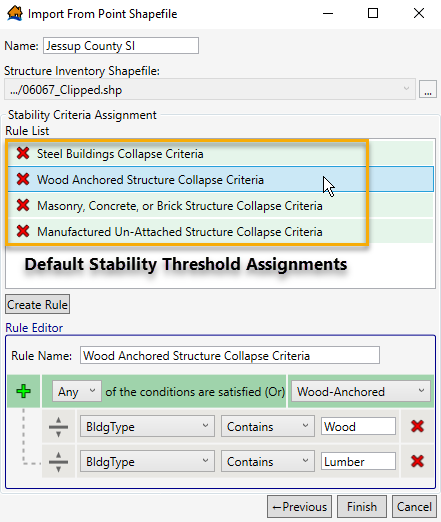
The user may also edit the default rule list by clicking on the "Create Rule" button as shown in Figure. Here, the user has flexibility to set a rule based on any of the structure attributes within the inventory and select whether that rule should go into effect if "Any" or "All" of the criteria are satisfied. The rules are a "rule stack" so the order in which the criteria are defined is important. Meaning, if two rules could be applied to the same structure, the higher rule will dominate. The user should also take care to make sure all structures are covered by at least one rule or stability criteria will not be assigned.
The structure stability criteria can be re-assigned after import using the Stability Criteria Assignment Tool.
Number of Stories
Number of stories must be defined for all structures within the LifeSim model. It must be defined as any non-negative integer. Some structures can have zero stories such as a tent/campground, construction site, or field. Otherwise, number of stories should include all habitable stories within a structure. The height of the structure should not impact defining number of stories. For example, a 30-foot warehouse with a single floor should be assigned one story, while a residence of the same height with three floors should be assigned three stories. This parameter does not include basements, attics, or accessible roofs, which are accounted for via different inputs in the software.
The following elements of LifeSim are generally dependent on the number of stories:
- Vertical evacuation potential
- Stability criteria
- Structure and content damages
People within structures have increased vertical evacuation potential with additional stories. In LifeSim, it is assumed that all occupants – regardless of age or mobility – can access higher stories within a structure. In general, a larger number of stories increases the chances of survival for occupants caught within a structure.
The number of stories can also affect the stability threshold for structures within the inventory. For USACE stability functions based on CH2M Hill (1974) [?], there is a positive relationship between number of stories and stability threshold, assuming that taller structures are built with stronger foundations, which are less likely to collapse due to flooding.
The number of stories can impact the total damage to a structure and contents. For example, a two-story structure will incur less damage with 4 feet of flooding than a one-story structure. The USACE and FEMA have established depth-damage functions for structures with different numbers of stories. Default depth-damage functions are specified in LifeSim for residential and non-residential structures. The default residential functions for structure and contents for residential structures are based on EGM 04-01 (USACE, 2003) [?]. Non-residential functions are based on the functions defined in HEC-FIA (USACE, 2015a) [?].
Construction Type
The construction type refers to the predominant building material, which can often differ from the structure's appearance. For example, a single family home might have walls coated with stucco or a brick overlay, but because it is framed and supported with wood, it should be assigned a "wood" construction type. The same principle applies to structures with steel frames.
The construction type parameter is used primarily to define stability thresholds for each structure. It is not used in the LifeSim computations. Structures imported into LifeSim from NSI are automatically assigned a construction type. The construction type inputs listed in Table are standard within the NSI.
| Construction Type | Examples |
|---|---|
| Wood | Most permanent single family homes, some small businesses. |
| Masonry | Unreinforced brick and stone structures. |
| Manufactured | Immobile trailers, modular homes. |
| Concrete | Concrete and cinderblock structures. |
| Steel | Steel reinforced structures, high-rises, newer office buildings, newer warehouses. |
Other construction types may be input by the user and assigned to structures, but they will not automatically be assigned a stability function because the default rules only encompass structures with NSI default construction types. User-defined rules must be set to ensure these structures are assigned a stability function.
Heights (Foundation, Ground Floor, Above Ground, and Attic)
Foundation, ground floor, above ground floor, and attic heights are used within LifeSim to define the vertical evacuation potential for each structure. A diagram of the key structure height attributes is shown in Figure.
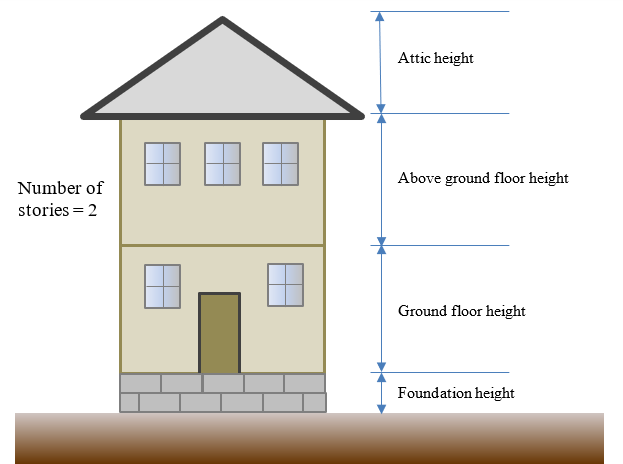
LifeSim uses the structure heights and a vertical evacuation model (explained in Vertical Evacuation Within Structures) to simulate how occupants caught within a structure move up and away from flood waters. The height within the structure that occupants can reach and depth of flooding at the structure are necessary to establish the submergence criteria, which is discussed in more detail in Submergence Criteria.
Structure height components must be defined for all structures within an inventory. The NSI only contains the foundation height parameter. The remaining three height parameters (ground floor, above ground, and attic height) must be imported from another source, manually assigned, or use default values available within LifeSim.
Table shows default height values assigned by LifeSim.
| Parameter | Height |
|---|---|
| Ground floor height | 9 feet |
| Above ground floor height | 9 feet |
| Attic height | 6 feet |
Population Parameters
LifeSim requires four population parameters defined for each structure. These include the under 65 population and over 65 population for both 2 PM (daytime) and 2 AM (nighttime). It can be difficult to estimate the population for each structure in a structure inventory if it does not already exist. LifeSim has the capability to populate existing structures using data from the U.S. Census Bureau.
Population Parameters Defined by Alternative
In LifeSim, some population parameters are specified by the alternative model component. Table describes the various population parameters, potential ranges for each, and the impact they have on the model outcome.
| Parameter | Default | Range (Best Practice) | Source Data / Considerations | Sensitivity to Results |
|---|---|---|---|---|
| Fraction limited mobility under 65 | 0.051 | 0-1 | Regional health statistics, Determines ability to evacuate vertically | High |
| Fraction limited mobility over 65 | 0.226 | 0-1 | High | |
| Fraction that can swim | 0.45 | 0.40-0.85 | Regional statistics. Applies to those evacuating on foot. Determines hazard zone when caught in flood waters. | Depends on percent of evacuees on foot. Could be significant. |
Fraction Limited Mobility (Under/Over 65)
Age is often used as a proxy for people with limited mobility and ability to self-rescue. The population in LifeSim is split into over and under 65 years old because it is a common dividing line in Federal data sets. The fatality rate applied is the same for all ages, but the chance that an elderly person reaches a low hazard zone (like a roof or attic in a flooded house) is less due to their higher probability of having limited mobility. The phenomenon has been demonstrated in several flood events where elderly people (especially those living alone) are overrepresented in the fatality data (Jonkman et al., 2009 [Hurricane Katrina]; Jonkman et al., 2018 [Hurricane Harvey]) [?] [?]. An exception is when elderly people are living in multi-generational homes such as in Japan (Risher et al., 2017) [?].
In LifeSim 2.0, a fraction of population with limited mobility is treated separately for population over 65 and under 65. Limited mobility is used to determine vertical evacuation potential, i.e., the ability to access areas such as a roof. If a person has been determined to have limited mobility, LifeSim assumes that that person will not be able to evacuate above the highest story of a building to access the roof or attic. LifeSim assumes able bodied people without roof or attic access will climb onto furniture or take other measures inside the structure to stay above the water, but people with low mobility will not take these actions and will be subject to lower submergence thresholds.
The fraction of population with limited mobility is a user-specified parameter entered separately for population over and under age 65. This parameter is specified by alternative and applied to the structure inventory as a whole. The default values in LifeSim are based on the 2017 national average of people with "ambulatory difficulty" from U.S. Census Bureau data: 22.6% (over 65), and 5.1% (under 65). This information comes from the American Community Survey (ACS) 5-Year Estimates [?].
The U.S. Census Bureau tracks six types of disabilities in the "non-institutionalized population:"
- Vision difficulty
- Hearing difficulty
- Cognitive difficulty
- Ambulatory difficulty
- Self-care difficulty
- Independent living difficulty
The U.S. Census Bureau also defines a generic disability status that varies by age (see here for definitions). The ambulatory difficulty survey question asked respondents if they had "serious difficulty walking or climbing stairs."
Using the non-institutionalized population as the basis for the percentage creates some limitations to the data. It can be applied to a community at-large but is not valid for institutional structures, especially those dedicated to caring for people with disabilities (e.g., hospitals, nursing homes). Non-institutionalized Group Quarters (GQ) facilities are included in the data. The institutionalized GQ population includes (but is not limited to) people living in adult correctional facilities, juvenile facilities, nursing facilities/skilled nursing facilities, in-patient hospice facilities, residential schools for people with disabilities, and hospitals with patients who have no usual home elsewhere. The non-institutionalized GQ population includes people living in college/university student housing, military barracks, emergency and transitional shelters, and group homes (Brault, 2008) [?]. If institutional facilities are a significant percentage of the PAR, the overall percentage with limited mobility may need to be raised.
The ACS data is available by state, county, city, or census tract and easy to parse. The fraction of limited mobility may vary significantly by region and year. Care should be taken to use a rate that represents the impacted area.
Data also show the rate increases dramatically for populations over 75. If the impact area has an over 65 population that tends to be much older than average (e.g., senior living communities), the rate could be raised.
Children are not considered separately from adults. Children are lumped together with adults under 65 because it is assumed if there is a child present, there is an adult nearby to help them overcome any mobility limitations. Conversely, adults over 65 usually won't have a younger adult with them.
Fraction That Can Swim
Swimming ability is assigned randomly to the total population within the inventory based on a user defined percentage of people with swimming ability. This is defined at the alternative level.
In LifeSim, swimming ability is always considered when human stability is a factor in the computations. It is used to sort people into high and low hazard zones when they are exposed to deep but slow-moving water. These conditions do not cause structure failure and can be easily survived for a time by people who can swim. This includes scenarios in which a car loses stability but a person does not know if they will be in a low hazard situation instead of high hazard.
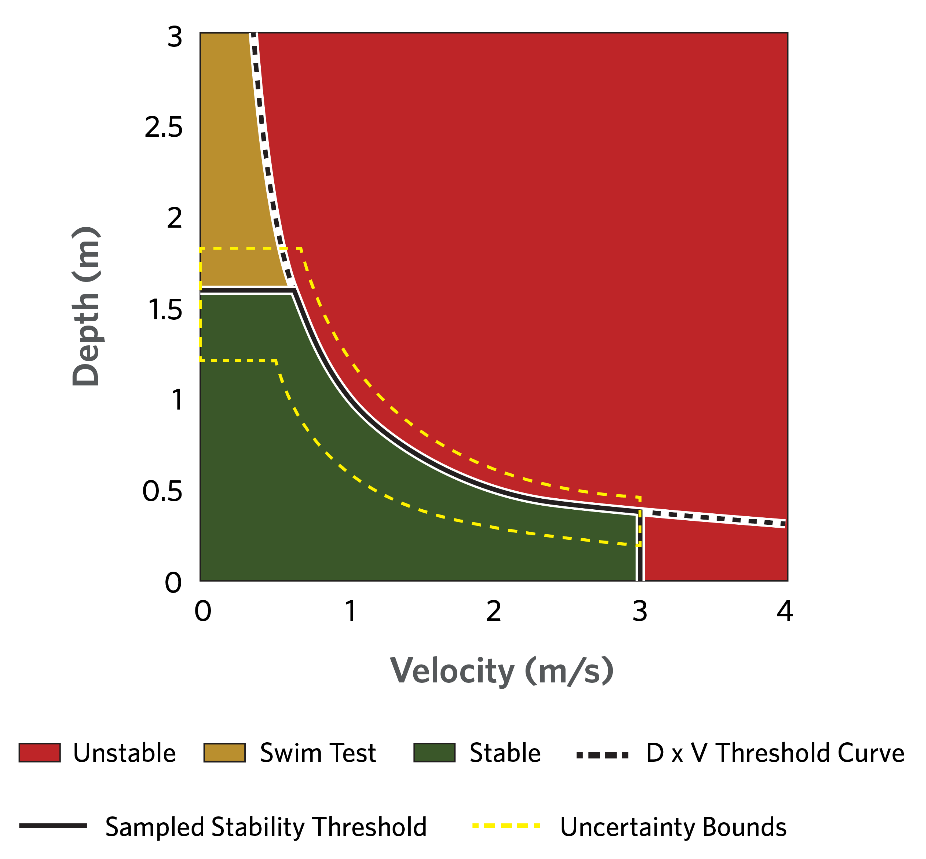
It is assumed the swimming population can reach a lower risk situation if exposed to these conditions, but people in these conditions who cannot swim are placed in the high hazard zone. It is important to point out that if a person is assumed to have limited mobility, they will not be able to swim. The stability of swimming people is shown in Figure. Swimming ability is applied for people evacuating on foot.
The best practice range of swimming ability is 40% to 85% and may vary widely by region. In a 1994 survey by Gilchrist et al. (2000), respondents self-reported that 63% could swim at least one pool length. A 2014 survey by the American Red Cross stated that 80% of people claimed they can swim, but only 56% of the swimmer group reported they can perform the five basic water competencies, indicating people have an overconfidence in their abilities. Based on those results, only 45% of all people can perform basic water competencies. Both surveys also noted significant demographic trends in swimming ability for age, race, and gender.
The Red Cross "water competencies" are focused on the ability to self-rescue. These critical water safety skills are the ability to, in this order: step or jump into water over one's head; return to the surface and float or tread water for one minute; turn around in a full circle and find an exit; swim 25 yards to the exit; and exit from the water. In a pool, this must be possible without using the ladder.
Longitudinal Employer-Household Dynamics (LEHD) Population Assignment Method
The LEHD program is part of the Center for Economic Studies at the U.S. Census Bureau. The LEHD program produces high quality, cost effective, public use local labor market data and demographic data. LEHD data are based on different administrative sources, primarily Unemployment Insurance (UI) earnings data and the Quarterly Census of Employment and Wages (QCEW), censuses and surveys. LifeSim uses data on where workers live and work to inform where people are at different times during the day.
Below is a summary of the steps and processes LifeSim uses to import population from LEHD into the structure inventory. The current implementation is only for U.S. Census 2010 data. Future implementations will include other years.
- Determine which counties overlap the structure inventory.
- Download census block data from each county that overlaps the structure inventory.
- Use point in polygon testing to associate which structures are within each census block.
- Get population data for each census block from the census data.
- Download the LEHD Origin-Destination Employment Statistics (LODES) [?] data for each state that the structure inventory is in.
- Get total jobs to and from census blocks that have been determined from step 3. This includes working population in census blocks coming from other states.
- Get fraction of population 65 years and over by census block.
- For each census block in the collection of overlapping census blocks, LifeSim determines the total population split out by non-residential and residential.
- Residential population in a census block is determined using the following formulas:
where:
RPU65 D = Residential Daytime Population Under 65 Years of Age.
RPO65 D = Residential Daytime Population Over 65 Years of Age.
RPU65 N = Residential Night-time Population Under 65 Years of Age.
RPO65 N = Residential Night-time Population Over 65 Years of Age.
PR = Residential Population in census block from census data.
PRW = Residential Population working in other census blocks.
FE = Fraction of population in census block that is over the age of 65.
- Non-residential population in a census block is determined using the following formulas:
where:
NRPU65 D = Non-Residential Daytime Population Under 65 Years of Age.
NRPO65 D = Non-Residential Daytime Population Over 65 Years of Age.
NRPU65 N = Non-Residential Nighttime Population Under 65 Years of Age.
NRPO65 N = Non-Residential Nighttime Population Over 65 Years of Age.
PNRW = Non-Residential Working Population (from other/current census block).
FE = Fraction of population in census block that is over the age of 65.
- Distribute the population to structures based on their occupancy types and households.
- At each census block, the total daytime and nighttime household for residential and non-residential is calculated based on the structures in the census block and their occupancy types. Each structure is then assigned a household weight value as the structure household value divided by the total household value for the structure damage category for both day and night.
A table of default household values for occupancy types is provided in Table below.
- Population is then determined per structure for day, night, over 65, and under 65 years of age by taking the population values calculated in Step 8 and distributing them to the structures based on the weights calculated in Step 9a. Residential population values (e.g., RPU65 D) are distributed to residential occupancy types and non-residential population is distributed to non-residential occupancy types.
- Once the population has been distributed to the structure inventory, the results are saved to the structure inventory attributes.
| Occupancy Type | Daytime Households | Nighttime Households | Damage Category |
|---|---|---|---|
| RES1-1SNB | 1 | 1 | Residential |
| RES1-1SWB | 1 | 1 | Residential |
| RES1-2SNB | 1 | 1 | Residential |
| RES1-2SWB | 1 | 1 | Residential |
| RES1-3SNB | 1 | 1 | Residential |
| RES1-3SWB | 1 | 1 | Residential |
| RES1-SLNB | 1 | 1 | Residential |
| RES1-SLWB | 1 | 1 | Residential |
| RES1 | 1 | 1 | Residential |
| RES2 | 1 | 1 | Residential |
| RES3AI | 2 | 2 | Residential |
| RES3BI | 3.5 | 3.5 | Residential |
| RES3CI | 7 | 7 | Residential |
| RES3DI | 14.5 | 14.5 | Residential |
| RES3EI | 34.5 | 34.5 | Residential |
| RES3FI | 50 | 50 | Residential |
| RES3A | 2 | 2 | Residential |
| RES3B | 3.5 | 3.5 | Residential |
| RES3C | 7 | 7 | Residential |
| RES3D | 14.5 | 14.5 | Residential |
| RES3E | 34.5 | 34.5 | Residential |
| RES3F | 50 | 50 | Residential |
| RES4 | 50 | 50 | Residential |
| RES5 | 50 | 50 | Residential |
| RES6 | 50 | 50 | Residential |
| COM1 | 2 | 0.1 | Commercial |
| COM2 | 2 | 0.1 | Commercial |
| COM3 | 2 | 0.1 | Commercial |
| COM4 | 2 | 0.1 | Commercial |
| COM5 | 2 | 0.1 | Commercial |
| COM6 | 2 | 0.1 | Commercial |
| COM7 | 2 | 0.1 | Commercial |
| COM8 | 2 | 0.1 | Commercial |
| COM9 | 2 | 0.1 | Commercial |
| COM10 | 2 | 0.1 | Commercial |
| IND1 | 5 | 1 | Industrial |
| IND2 | 5 | 1 | Industrial |
| IND3 | 5 | 1 | Industrial |
| IND4 | 5 | 1 | Industrial |
| IND5 | 5 | 1 | Industrial |
| IND6 | 5 | 1 | Industrial |
| AGR1 | 2 | 0.1 | Agriculture |
| REL1 | 2 | 0.1 | Religious |
| GOV1 | 2 | 0.1 | Public |
| GOV2 | 2 | 0.1 | Public |
| EDU1 | 5 | 0.1 | Education |
| EDU2 | 5 | 0.1 | Education |
Human Stability Criteria
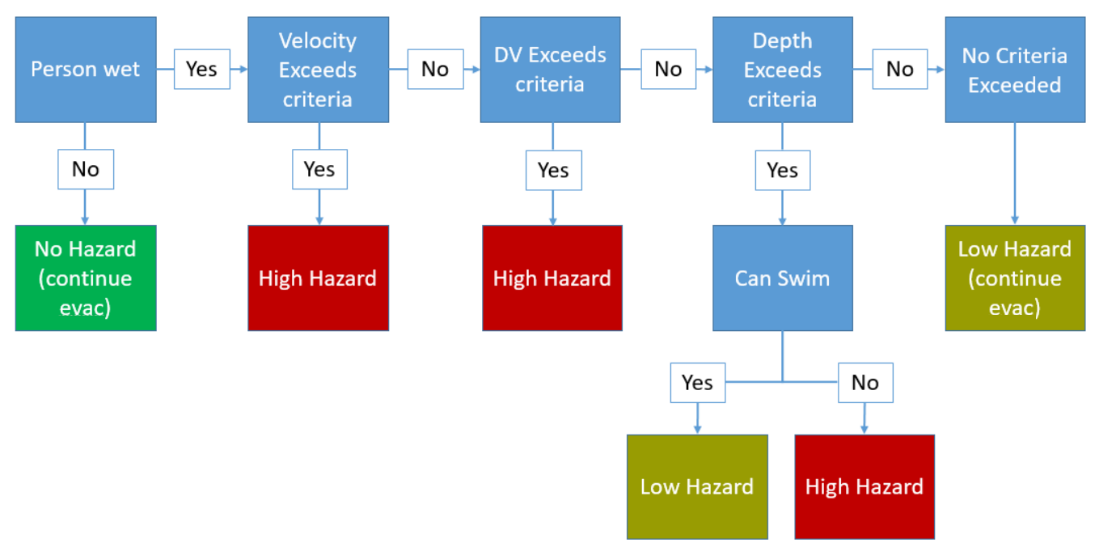
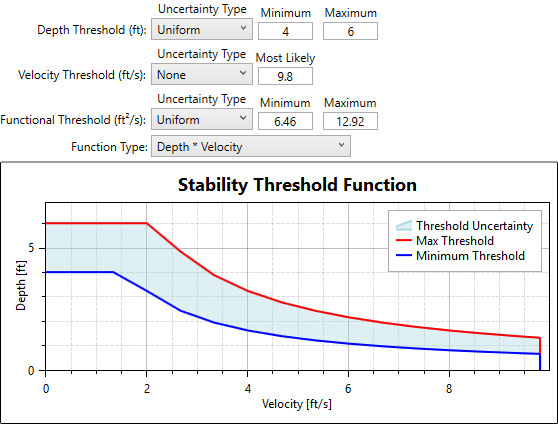
People can be caught in open flood waters if they are evacuating by foot or they abandon a trapped vehicle for a nearby structure, high ground, or a destination. In these cases, pedestrian safety is compromised affecting their ability to remain standing or to traverse flood water and is considered as a function of the depths and velocities of the flood water at that location and human stability criteria (Russo et al., 2013) [?]. A person's ability to remain standing is defined in LifeSim as thresholds of depth, velocity, and DV or DV2. If instantaneous depth and velocity at a person's location exceed the velocity or DV thresholds, then the person is assumed to be in a high hazard situation. If only the depth criterion is exceeded, then a person's hazard classification is dependent on the person's ability to swim. The human stability criteria flow logic is summarized in Figure.
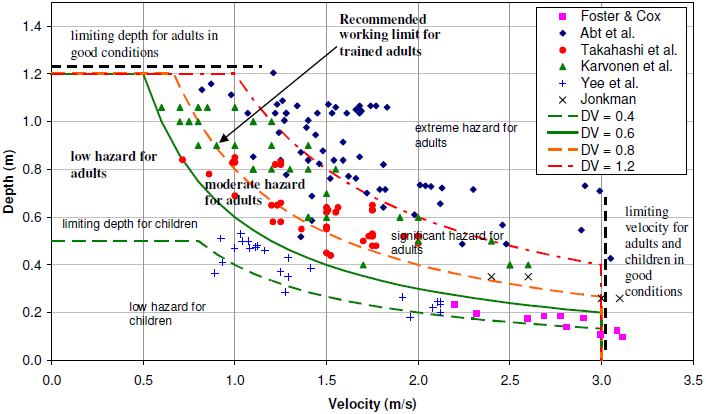
There has been significant scientific research into a person's ability to remain stable in flood waters. Most of the known research has been summarized in Shand et al., 2011 [?], as demonstrated in Figure.
Shand's summary of existing research shows uncertainty about the depths and velocities required to cause a person to lose stability. Naturally variable factors such as footing, clothing, shoe type, and a person's health can all play into an individual's ability to remain standing in flooding water. The default functions in LifeSim for human stability pulled heavily from the research documented in Shand et al., 2011. In LifeSim, it is assumed that anyone with limited mobility, especially the young, will be with an able-bodied person who can help. The default functions in LifeSim for human stability are shown in Figure.
Property Value
Property values are attributes required by LifeSim for damage computations. The user can define any or all of the property values. Definitions of the different property values used in LifeSim are listed in Table.
| Property Values | Definition |
|---|---|
| Structure value | The structure value is the value of the structure and does not include the contents value. Typically defined as the depreciated replacement value. |
| Contents value | Contents value is the value of the contents associated with the structure and does not include the structure value. This value is often based on a content-to-structure-value ratio (EM 1110-2-1619). |
| Vehicle value | Vehicle value includes the value of any vehicles associated with the structure. |
| Other value | Other value is the value of "other" property such as a garage associated with the structure, but does not include the structure value. |
General Modeling Guidelines
The user should consider the following when developing a structure inventory for a LifeSim study:
-
The user should always verify and check structure inventory data, especially structure placement, occupancy type, and foundation height as these attributes are used for damage and fatality estimates. Structure inventory files can be edited directly in LifeSim without going to an outside program. The user can validate data using aerial imagery from web services such as Google Maps.
-
The spatial extent of the inventory should include anything that could possibly be impacted, typically the maximum inundated area.
-
One best practice for estimating foundation heights and structure types would be to use Google Street View or conduct a drive-by survey.
-
Depth-damage functions are defined in LifeSim by the structure occupancy type. For residential structures, confirm that the occupancy type matches the number of stories. For example, a single-family residence (SFR) with no basement with number of stories set to 1 should also have the occupancy type set as RES1-1SNB (SFR one story, no basement) in order for the correct depth-damage function to be assigned.
-
The 2020 census data may be outdated in some places depending on development and migration trends. Consider adjustments to the growth of population from the 2020 data until the next census data is released. Most counties or large municipalities will have a population growth rate since the last census and may also have estimates for future growth.
-
While the NSI is a great resource for the USACE, it is by no means perfect and should be reviewed thoroughly prior to use. Recommended user quality checks and known limitations of NSI 2026 are detailed in the NSI Technical References FAQs. Some of the most common NSI data issues include:
- Alignment and placement of structures.
- Population distribution in structures.
- Occupancy type definition.
- Foundation heights.
-
Spot-checking your population data is a manual process. How population is distributed in structures should be reviewed. The user should ensure population estimates match the structure type (e.g., a mobile home with 100 people is not realistic). A quick check could include sorting inventory attributes by population and verifying the number of people associated with each occupancy type is appropriate.
-
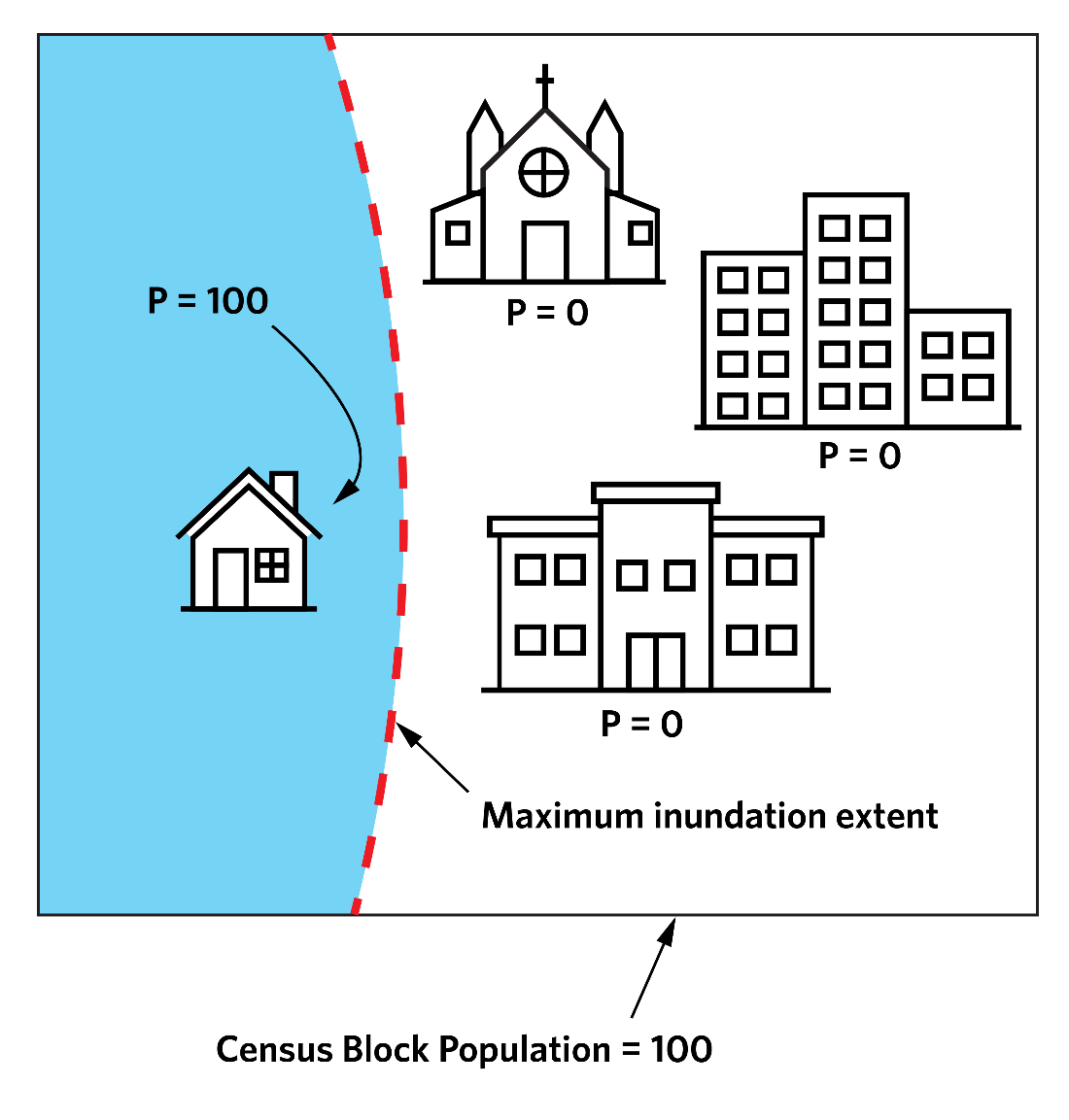
When importing population from either the LEHD or NSI data source, the structures along the maximum inundation extent may only partially cover a census block (see Figure). In this case, only a portion of structures within the census block are included but they are populated with the total population in the census block. This may lead to over-populated structures around the perimeter.
-
In LifeSim, the PAR is calculated as the number of people within structures subject to inundation at the time of warning issuance. This does not always include the entire population within the model, as people outside of the inundated area when the warning is issued would not be considered PAR. However, those people outside the inundated area could still take protective action and be included in the traffic simulation. Depending on user preference, the structure inventory (and thus the population within the model) can be defined as only the structures subject to inundation, in which case the total population of the model and the PAR would be equal.
-
Currently "trip chaining" is not considered in LifeSim. Trip chaining is when a person makes multiple stops during the evacuation. For example, a mother may receive the first alert at work and drive to pick up her children at school before exiting the flooded area. LifeSim will only simulate the mother's evacuation from work to the destination she can reach fastest and not consider any stops in-between. The implications of ignoring trip chaining are the incorrect spatial distribution of population at the start of evacuation, misrepresentation of traffic congestion, and incorrect destination selection. There is currently no method to approximate trip chaining in an evacuation scenario.